Installation Guide: Oracle REST Data Services (ORDS) 25.x in Standalone Mode
High Availability Deployment — 2 Nodes + Load Balancer
Version: 1.0
Date: March 2026
Applies to: ORDS 25.x · Oracle APEX 24.x · Oracle Linux 8/9 · Java 17
Table of Contents
- Introduction and Architecture
- Prerequisites
- Environment Reference Data
- Installation on Node 1
- Installation on Node 2
- Configuration as a systemd Service
- Load Balancer Configuration
- Environment Validation
- Parameter Reference
1. Introduction and Architecture
Oracle REST Data Services (ORDS) is the web gateway that enables access to Oracle APEX and exposes REST APIs over an Oracle database. In standalone mode, ORDS uses an embedded web server (Jetty) without requiring an application container such as WebLogic or Tomcat.
Why Standalone Mode?
- It is the officially Oracle-recommended mode for new deployments
- Eliminates the complexity of managing an additional application server
- Supports Java 17+ without compatibility restrictions
- Lower maintenance overhead and attack surface
Environment Architecture
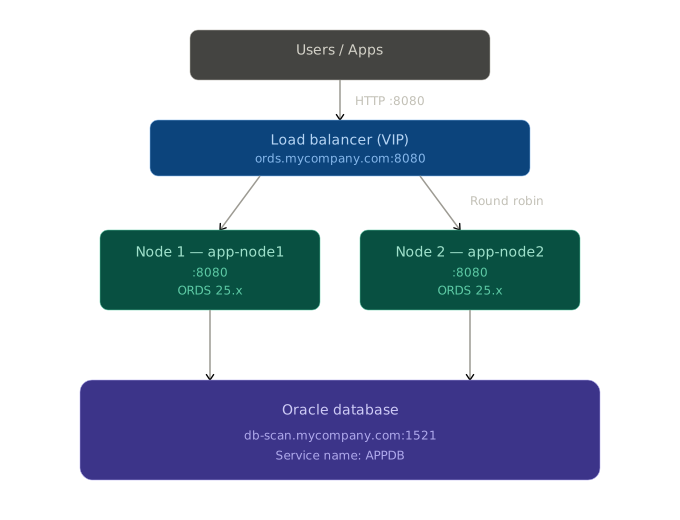
Note: Both nodes share the same ORDS configuration and point to the same database service. The Load Balancer distributes traffic between them using Round Robin.
2. Prerequisites
Before starting the installation, verify the following requirements are met on both nodes:
Operating System
- Oracle Linux 8 or 9 (or equivalent RHEL)
oracleuser with sudo access orrootaccess available- SSH connectivity between nodes
Java
- Oracle JDK 17 or higher installed
- ORDS 25.x requires Java 17 as a minimum — earlier versions are not compatible
Database
- Oracle Database 19c or higher
- APEX 24.x installed and in VALID state in the target PDB
SYS AS SYSDBAcredentials available- Connectivity from the nodes to the database SCAN listener
Disk Space
- Minimum 2 GB free in the ORDS installation directory
- Minimum 500 MB additional for APEX static images
- Additional space for logs
Ports
- Port 8080 available on both nodes (or the defined port)
- Port 8080 enabled in the firewall toward the Load Balancer
3. Environment Reference Data
⚠️ Replace these values with your actual environment data before executing the commands.
| Parameter | Example Value | Description |
|---|---|---|
| Node 1 hostname | app-node1.mycompany.com |
Middleware server node 1 |
| Node 2 hostname | app-node2.mycompany.com |
Middleware server node 2 |
| Load Balancer VIP | ords.mycompany.com |
Balanced URL |
| ORDS port | 8080 |
HTTP listening port |
| SCAN listener | db-scan.mycompany.com |
Database SCAN hostname |
| DB port | 1521 |
Listener port |
| PDB Service Name | APPDB |
Target PDB service name |
| ORDS home | /u02/app/ords |
ORDS installation directory |
| ORDS config | /u02/app/ords/config |
Configuration directory |
| APEX images | /u02/app/ords/apex_images |
Static images directory |
| ORDS logs | /u02/app/ords/log |
Logs directory |
| Java home | /u01/java/jdk-17 |
Java 17 directory |
| OS user | oracle |
Operating system user |
4. Installation on Node 1
All commands in this section are executed on app-node1 as the oracle user, unless otherwise indicated.
4.1 Verify Prerequisites
# Verify Java version
export JAVA_HOME=/u01/java/jdk-17
export PATH=$JAVA_HOME/bin:$PATH
java -version
Expected output:
java version "17.x.x" ...
Java HotSpot(TM) 64-Bit Server VM ...
# Verify available disk space
df -h /u02

# Verify connectivity to the database
tnsping db-scan.mycompany.com
4.2 Prepare Directory Structure
Create the necessary directories before proceeding.
mkdir -p /u02/app/ords
mkdir -p /u02/app/ords/config
mkdir -p /u02/app/ords/log
mkdir -p /u02/app/ords/apex_images
mkdir -p /u02/app/ords/deploy
mkdir -p /u02/app/ords/bin

# Verify created structure
ls -la /u02/app/ords/
4.3 Download and Install ORDS
Download the ords-25.x.x.zip file from Oracle Software Delivery Cloud or oracle.com/rest.
# Extract ORDS into the installation directory
cd /u02/app/ords
unzip /tmp/ords-25.x.x.zip

# Verify the binary exists
ls -la /u02/app/ords/bin/ords

# Add ORDS to PATH and verify version
export JAVA_HOME=/u01/java/jdk-17
export ORDS_HOME=/u02/app/ords
export PATH=$JAVA_HOME/bin:$ORDS_HOME/bin:$PATH

ords --version
Expected output:
ORDS: Release 25.x Production on [date]
Copyright (c) 2010, 2026, Oracle.
Oracle REST Data Services 25.x.x.rXXXXXXX
Note: The WARNING about the config folder location is informational and does not block operation.
4.4 Deploy APEX Static Images
ORDS in standalone mode requires APEX static images to be available locally. Extract them from the APEX installation ZIP.
# Extract images from APEX ZIP (adjust path to the ZIP file)
unzip /tmp/apex_24.x.zip "apex/images/*" -d /tmp/apex_extract/

# Copy images to the definitive directory
cp -r /tmp/apex_extract/apex/images/* /u02/app/ords/apex_images/

# Verify content
ls /u02/app/ords/apex_images/ | head -10
du -sh /u02/app/ords/apex_images/
4.5 Install ORDS into the Database
This step creates the ORDS_METADATA and ORDS_PUBLIC_USER schemas inside the target PDB. This is the longest step — it can take between 20 and 30 minutes depending on hardware.
export JAVA_HOME=/u01/java/jdk-17
export ORDS_HOME=/u02/app/ords
export PATH=$JAVA_HOME/bin:$ORDS_HOME/bin:$PATH

ords --config /u02/app/ords/config install \
  --admin-user SYS \
  --db-hostname db-scan.mycompany.com \
  --db-port 1521 \
  --db-servicename APPDB \
  --log-folder /u02/app/ords/log \
  --feature-sdw true
The installer will interactively prompt for the SYS AS SYSDBA password.
Expected output when finished:
INFO  Installing Oracle REST Data Services version 25.x.x...
INFO  ... Verified database prerequisites
INFO  ... Created Oracle REST Data Services proxy user
INFO  ... Created Oracle REST Data Services schema
INFO  ... Granted privileges to Oracle REST Data Services
INFO  ... Created Oracle REST Data Services database objects
INFO  Completed installation for Oracle REST Data Services version 25.x.x
      Elapsed time: 00:25:XX.XXX
⚠️ Important: If the command fails with the
--admin-userflag, use interactive mode:ords --config /u02/app/ords/config install --interactive \ --log-folder /u02/app/ords/log
4.6 Configure ORDS Parameters
Once installed, configure the additional parameters needed for correct operation with APEX and the Load Balancer.
export JAVA_HOME=/u01/java/jdk-17
export ORDS_HOME=/u02/app/ords
export PATH=$JAVA_HOME/bin:$ORDS_HOME/bin:$PATH

# Enable Load Balancer header support (required for VIP)
ords --config /u02/app/ords/config config set proxy.forwardedHeaders true

# Configure listening port
ords --config /u02/app/ords/config config set standalone.http.port 8080

# Configure APEX static images path
ords --config /u02/app/ords/config config set standalone.static.path /u02/app/ords/apex_images

# Configure access log directory
ords --config /u02/app/ords/config config set standalone.access.log /u02/app/ords/log

# Verify complete configuration
ords --config /u02/app/ords/config config list
Verify that pool.xml contains the correct values:
cat /u02/app/ords/config/databases/default/pool.xml
Key values must be:
<entry key="db.connectionType">basic</entry>
<entry key="db.hostname">db-scan.mycompany.com</entry>
<entry key="db.port">1521</entry>
<entry key="db.servicename">APPDB</entry>
<entry key="db.username">ORDS_PUBLIC_USER</entry>
<entry key="plsql.gateway.mode">proxied</entry>
<entry key="proxy.forwardedHeaders">true</entry>
4.7 Foreground Startup Test
Before configuring the systemd service, verify that ORDS starts correctly in the foreground.
export JAVA_HOME=/u01/java/jdk-17
export ORDS_HOME=/u02/app/ords
export PATH=$JAVA_HOME/bin:$ORDS_HOME/bin:$PATH

ords --config /u02/app/ords/config serve \
  --port 8080 \
  --apex-images /u02/app/ords/apex_images
Expected output:
INFO  HTTP and HTTP/2 cleartext listening on host: 0.0.0.0 port: 8080
INFO  Mapped local pools from /u02/app/ords/config/databases:
  /ords/ => default => VALID
INFO  Oracle REST Data Services initialized
      Oracle REST Data Services version : 25.x.x.rXXXXXXX
      Oracle REST Data Services server info: jetty/12.x.xx
✅ The pool must appear as VALID. If it appears as INVALID, check database connectivity before proceeding.
Stop with Ctrl+C and proceed to the next step.
5. Installation on Node 2
Installation on Node 2 is similar to Node 1 with one important difference: the ORDS schema was already installed in the database in step 4.5, so it must not be executed again.
5.1 Copy Binaries from Node 1
Instead of downloading and extracting again, copy the binaries directly from Node 1. This ensures both nodes use exactly the same version.
# Execute on app-node2 as oracle
mkdir -p /u02/app/ords

# Copy ORDS binaries from Node 1
scp -r oracle@app-node1:/u02/app/ords/bin      /u02/app/ords/
scp -r oracle@app-node1:/u02/app/ords/lib      /u02/app/ords/
scp    oracle@app-node1:/u02/app/ords/ords.war  /u02/app/ords/

# Verify the binary exists and has permissions
ls -la /u02/app/ords/bin/ords
chmod +x /u02/app/ords/bin/ords
5.2 Copy Configuration and Images from Node 1
# Copy ORDS configuration (pool.xml, settings, etc.)
scp -r oracle@app-node1:/u02/app/ords/config /u02/app/ords/

# Copy APEX static images
scp -r oracle@app-node1:/u02/app/ords/apex_images /u02/app/ords/

# Create logs and bin directories
mkdir -p /u02/app/ords/log
mkdir -p /u02/app/ords/bin
5.3 Verify ORDS on Node 2
export JAVA_HOME=/u01/java/jdk-17
export ORDS_HOME=/u02/app/ords
export PATH=$JAVA_HOME/bin:$ORDS_HOME/bin:$PATH

# Verify version
ords --version

# Foreground startup test
ords --config /u02/app/ords/config serve \
  --port 8080 \
  --apex-images /u02/app/ords/apex_images
Verify the pool appears as VALID and stop with Ctrl+C.
6. Configuration as a systemd Service
Configuring ORDS as an OS service ensures it starts automatically at server boot and restarts in case of failure. This process must be performed on both nodes.
6.1 Create Startup Script
The script encapsulates the environment variables needed for systemd to start ORDS correctly.
# Execute as oracle user on each node
cat > /u02/app/ords/bin/start_ords.sh << 'EOF'
#!/bin/bash
export JAVA_HOME=/u01/java/jdk-17
export ORDS_HOME=/u02/app/ords
export PATH=$JAVA_HOME/bin:$ORDS_HOME/bin:$PATH

$ORDS_HOME/bin/ords \
  --config /u02/app/ords/config serve \
  --port 8080 \
  --apex-images /u02/app/ords/apex_images \
  >> /u02/app/ords/log/ords.log 2>&1
EOF

chmod +x /u02/app/ords/bin/start_ords.sh
6.2 Create the systemd Service File
This step requires root privileges.
# Execute as root on each node
cat > /etc/systemd/system/ords.service << 'EOF'
[Unit]
Description=Oracle REST Data Services
After=network.target

[Service]
Type=simple
User=oracle
ExecStart=/u02/app/ords/bin/start_ords.sh
ExecStop=/bin/kill -15 $MAINPID
Restart=on-failure
RestartSec=10
StandardOutput=append:/u02/app/ords/log/ords.log
StandardError=append:/u02/app/ords/log/ords.log

[Install]
WantedBy=multi-user.target
EOF
6.3 Configure Log Directory Permissions
# Execute as root on each node
mkdir -p /u02/app/ords/log
chown -R oracle:oinstall /u02/app/ords/log
6.4 Enable and Start the Service
# Execute as root on each node
systemctl daemon-reload
systemctl enable ords
systemctl start ords

# Wait for initialization and verify status
sleep 5
systemctl status ords
Expected output:
● ords.service - Oracle REST Data Services
   Loaded: loaded (/etc/systemd/system/ords.service; enabled; ...)
   Active: active (running) since [date time]
 Main PID: XXXXX (start_ords.sh)
   Memory: ~800M
6.5 Service Administration Commands
# View service status
systemctl status ords

# Stop the service
systemctl stop ords

# Restart the service
systemctl restart ords

# View logs in real time
tail -f /u02/app/ords/log/ords.log

# Verify autostart is enabled
systemctl is-enabled ords
7. Load Balancer Configuration
The Load Balancer distributes requests between the two ORDS nodes. The exact configuration depends on the LB vendor (F5, HAProxy, nginx, etc.), but the logical parameters are the same.
7.1 Required Parameters
| Parameter | Value |
|---|---|
| VIP / URL | ords.mycompany.com |
| Frontend port | 8080 |
| Protocol | HTTP/1.1 |
| Backend Node 1 | app-node1.mycompany.com : 8080 |
| Backend Node 2 | app-node2.mycompany.com : 8080 |
| Algorithm | Round Robin |
| Health Check URL | GET /ords/ |
| Health Check response | HTTP 302 |
| Session Persistence | Not required — ORDS is stateless |
| X-Forwarded-For Header | Enabled — required by ORDS |
Important: ORDS is already configured to receive and process the
X-Forwarded-Forheader via theproxy.forwardedHeaders=trueparameter set in step 4.6. Ensure the LB sends it.
7.2 Verify Header Forwarding from ORDS
Once the LB is configured, verify that ORDS correctly receives the headers:
# From any external client
curl -v http://ords.mycompany.com:8080/ords/

# Verify in ORDS logs that the real client IP appears
tail -20 /u02/app/ords/log/ords.log
7.3 Zero-Downtime Go-Live Strategy
If there is an active production URL that must not be interrupted during migration, use the following strategy:
TESTING PHASE (parallel):
  Old URL → Current system (no changes)
  New URL → New VIP  → ORDS 25.x (testing)

GO-LIVE (cutover):
  Only change DNS resolution:
  Old URL → New VIP → ORDS 25.x
  Execution time: minutes
  Rollback: revert DNS
8. Environment Validation
8.1 Per-Node Validation
Execute on each node individually:
# 1. Verify service is active
systemctl status ords | grep Active

# 2. Verify port is listening
ss -tlnp | grep 8080

# 3. Verify local HTTP response
curl -s -o /dev/null -w "%{http_code}" http://localhost:8080/ords/

# 4. Verify pool is VALID
grep "VALID" /u02/app/ords/log/ords.log | tail -5

# 5. Verify autostart is enabled
systemctl is-enabled ords
Expected results:
Active: active (running)          ← service running
LISTEN                            ← port listening
302                               ← correct HTTP response
/ords/ => default => VALID        ← pool connected to DB
enabled                           ← autostart enabled
8.2 Load Balancer Validation
# Verify access via balanced VIP
curl -v http://ords.mycompany.com:8080/ords/f?p=4550

# Expected result:
# HTTP/1.1 302 Found
# Location: http://ords.mycompany.com:8080/ords/r/apex/workspace/home
8.3 Failover Test
Verify that the LB redirects traffic when a node fails:
# 1. Stop ORDS on Node 1
systemctl stop ords   # on app-node1

# 2. Verify service is still available via VIP
curl -s -o /dev/null -w "%{http_code}" http://ords.mycompany.com:8080/ords/
# Must return 302

# 3. Restore Node 1
systemctl start ords   # on app-node1
8.4 Final Checklist
| Verification | Node 1 | Node 2 |
|---|---|---|
| ORDS service active | ☐ | ☐ |
| Port 8080 listening | ☐ | ☐ |
| DB pool → VALID | ☐ | ☐ |
HTTP 302 on /ords/ |
☐ | ☐ |
| Autostart enabled | ☐ | ☐ |
| Access via LB VIP | ☐ | — |
| Failover test | ☐ | — |
9. Parameter Reference
9.1 pool.xml Parameters
| Parameter | Description | Recommended Value |
|---|---|---|
db.connectionType |
DB connection type | basic |
db.hostname |
SCAN listener hostname | db-scan.mycompany.com |
db.port |
Listener port | 1521 |
db.servicename |
PDB service name | APPDB |
db.username |
ORDS connection user | ORDS_PUBLIC_USER |
plsql.gateway.mode |
PL/SQL gateway mode | proxied |
proxy.forwardedHeaders |
Enable LB headers | true |
restEnabledSql.active |
Enable REST SQL | true |
feature.sdw |
SQL Developer Web | true |
security.requestValidationFunction |
Authorization function | ords_util.authorize_plsql_gateway |
9.2 Standalone Parameters
| Parameter | Description | Recommended Value |
|---|---|---|
standalone.http.port |
HTTP listening port | 8080 |
standalone.static.path |
APEX images path | /u02/app/ords/apex_images |
standalone.access.log |
Access logs directory | /u02/app/ords/log |
9.3 Connection Pool Sizing
⚠️ The default value of
jdbc.MaxLimitis 10 connections — insufficient for production environments with high load.
# Adjust based on expected environment load
ords --config /u02/app/ords/config config set jdbc.InitialLimit 10
ords --config /u02/app/ords/config config set jdbc.MinLimit 5
ords --config /u02/app/ords/config config set jdbc.MaxLimit 30
Restart the service after changing these values:
systemctl restart ords
Guide prepared following Oracle official best practices for ORDS in production environments.
Reference: Oracle ORDS Best Practices